
Croft Plus
in testingThe optional paid layer for Croft: sealed messages and files between Plus members, Plus groups, and Croft Plus for computer, which syncs your phone's conversations to a chat app on your desk.
Plus never strands you: a person who is not on Plus gets an ordinary SMS or MMS, in the same conversation. Every group and every chat says how private it is right now, and tells you if that changes. Plain SMS and MMS have no privacy: they go through the carrier and are effectively public record. Only Plus to Plus messages are private. Croft says which is which.
Price
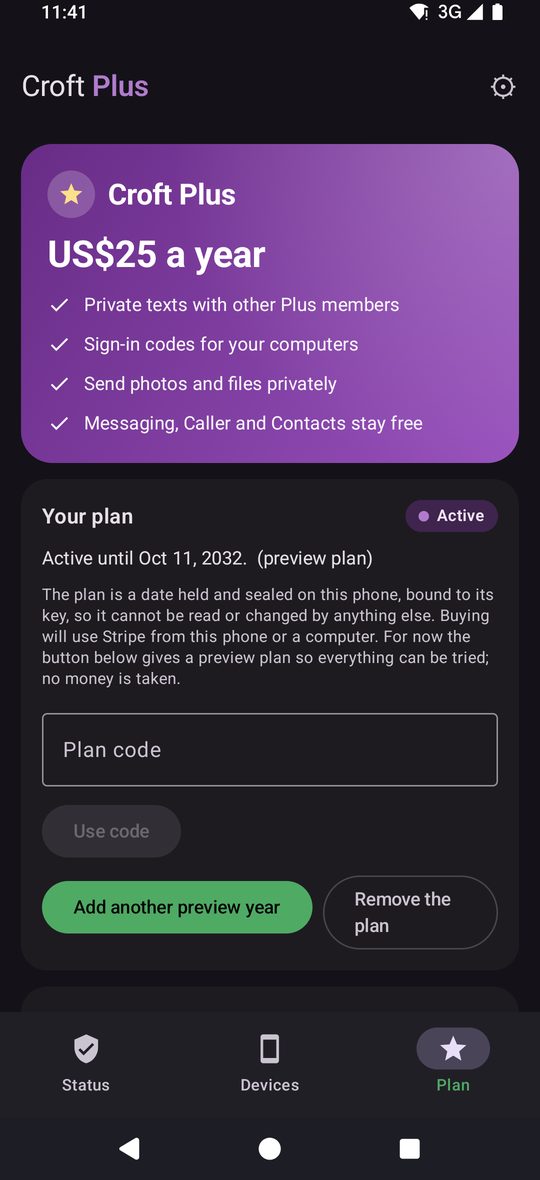
US$25 a year, one plan for every device you link. Messaging, Contacts and Caller stay free, with or without Plus. If a plan ends, texts go as ordinary SMS and MMS and nothing you had breaks.
Payment
Preview only: the plan is simulated, no real billing yet.
What Plus adds
- Messages sealed end to end between Plus members, with delivery ticks, reactions, replies, typing and read indicators (switchable), and disappearing messages.
- Undo, edit and delete for everyone on sent messages, Plus to Plus only. Plain SMS and MMS cannot be recalled or edited once sent.
- Files and pictures sealed too, with a size choice for Plus recipients.
- Plus groups, Mixed or Plus-only.
- Croft Plus for computer: your phone's conversations synced to a chat app on your desk (Linux working, Windows installer built, macOS planned).
- Your computer, anywhere, not only at home (service in preparation).
How the best of both worlds works
Think WhatsApp's features with iMessage's behaviour.
The app asks, in the background, whether a contact is on Croft Plus, without uploading anyone's phone book to a server. When two people have each other saved and both are on Plus, their conversation upgrades by itself. Everyone else stays on SMS and MMS, so nobody has to switch app for you.
- No phone-number lookup server and no contact upload. Whether someone is on Plus is learned by a direct exchange between the two phones.
- The app needs no internet permission for the free apps' core job. Only the optional Plus features use the network.
- Deniable by design. Messages are authenticated between the two people without leaving a signature a third party could use as proof.
- One conversation per person, whatever route a message took, with the route shown plainly.
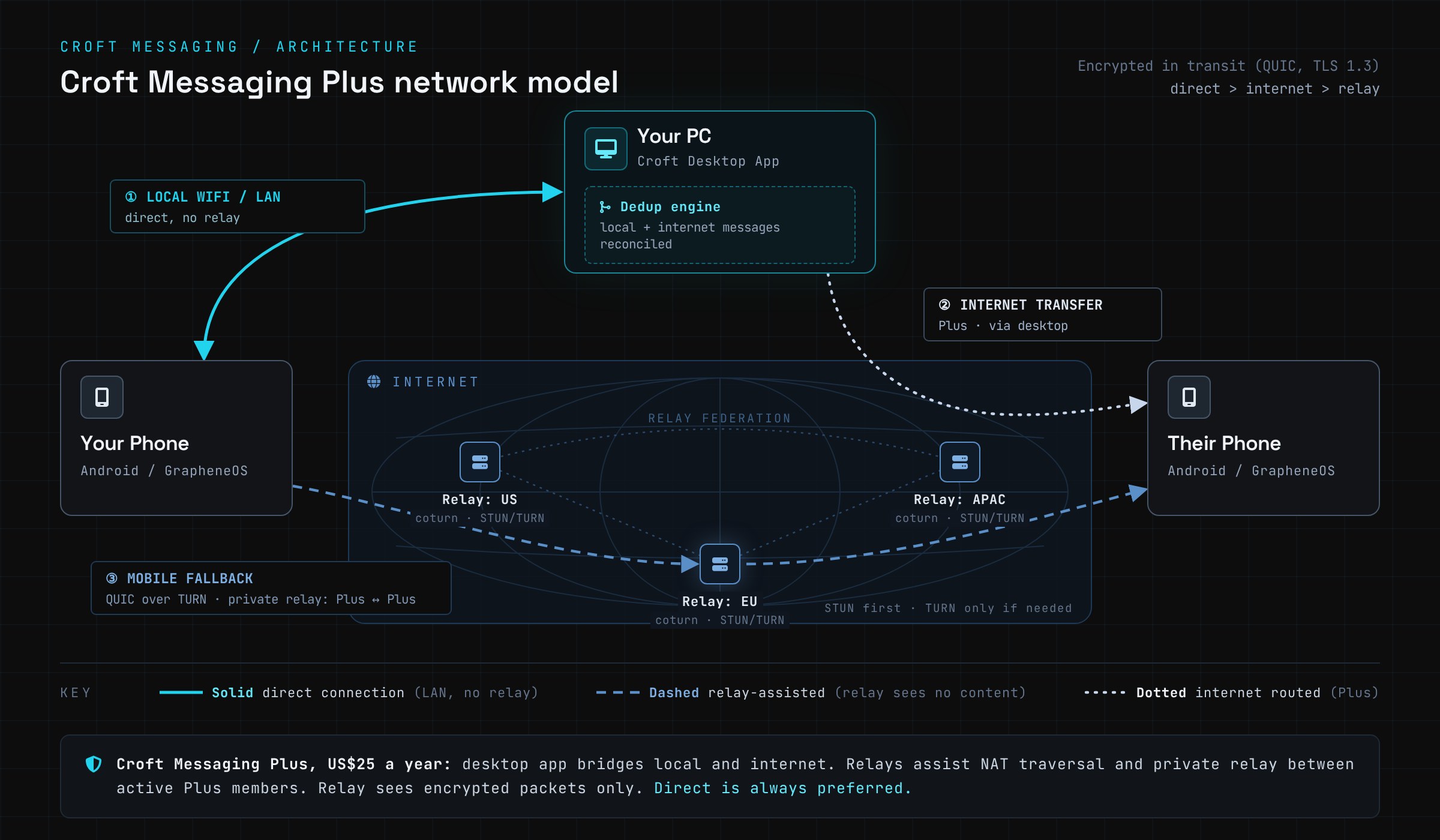
Two routes
How a sealed message travels between Plus members.
Standard
Held briefly until the other phone collects it.
Private
Live through a relay, nothing stored.
When some recipients aren't on Plus
Croft tells you which recipients aren't on Plus and asks what to do: send them an ordinary MMS or SMS, or leave them out of that message. You choose for each message. One conversation per person, whatever route a message took, with the route shown plainly.
Plus groups
Mixed
Plus members sealed, everyone else by SMS or MMS, which the carrier can see.
Plus-only
Every member is on Plus, so the whole group is encrypted end to end, like Plus chat messages. It never falls back to SMS.
Members accept an invitation, the roster is shared, and a group code lets two people confirm they hold the same group. A person who joins Plus later moves onto it, and someone who drops Plus is flagged, never silently downgraded.
Croft Plus for computer
Part of Croft Plus: your phone's conversations synced to a chat app on your desk. It keeps a copy of your SMS, MMS and Plus conversations in one list and talks straight to your phone, with no server in between. Reaching it from anywhere, not only at home, is in preparation.
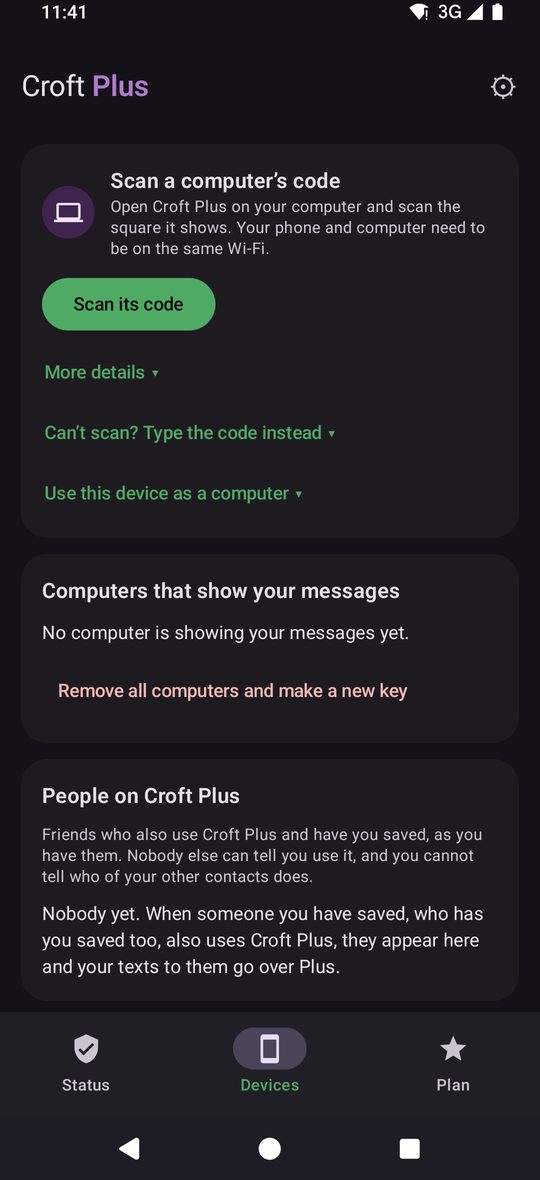
Link it by QR code with a six-digit match check, read and send from the desktop, and use sign-in codes as a second factor.
The phone is the source of truth. The computer is a copy that talks directly to your phone, with no cloud in between.
Messages to other Plus members go sealed. For anyone who isn't on Plus, Croft asks whether to send them an MMS or SMS, or leave them out of that message.
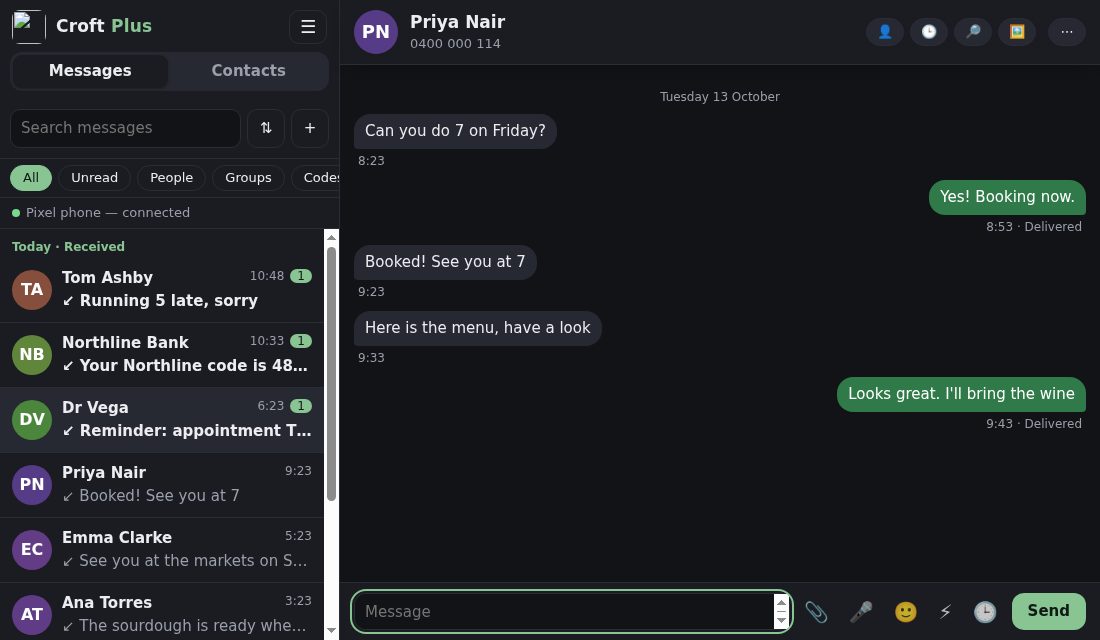
Type on a real keyboard
Pick up any conversation where the phone left it, search with Ctrl+K, and reply with Enter. Drafts are kept per conversation.
Drag and drop
Drop pictures and files into a conversation, or paste from the clipboard, review the tray, then send as a picture message from your phone.
Pictures the right way up
Sideways photos are straightened on the phone before they reach you, so the computer shows them upright.
Sync like a chat app
One list for SMS, MMS and Plus conversations, with the phone's own filters. New texts appear within seconds.
Everything Croft Plus for computer doesShow all 34Hide
Sync like a chat app
- One list for SMS, MMS and Plus conversations, with the phone's own filters: All, Unread, People, Groups, Codes, Transactions, Promotions, Archived
- First copy newest first, with a progress bar and time left
- Live: new texts appear within seconds and the page repaints in place
- Status page: this computer, your phone, the apps and versions, and your plan
Send and schedule
- Reply in any conversation; Enter sends, Shift+Enter makes a new line
- New message to several people, picked from your history
- Send later from the clock button; the phone sends it even if the computer is off, and Scheduled lists and cancels
- Quick replies from the phone
- Status on every message: Queued, Sending, Sent, Delivered, or Not sent with the reason and Try again
- Emoji panel and dictation
Pictures and files
- Drag and drop files onto a conversation, paste pictures, or use the paperclip
- Up to 10 files per message, 25 MB each
- Pictures show inline and open full size; other files fetch from the phone
- Pictures button filters a conversation to pictures and files
Contacts and people
- Messages / Contacts toggle, remembered
- Contacts page with search, filters (No number, Empty), new and edit saved to your phone
- Contact card strip on a conversation with History, Find and Pictures
- History of texts and calls together
Organise
- Pin, archive, mute, mark unread, block, report spam, nickname, export as text
- Star messages and copy a code with one click
- Delete on the computer only, or on the phone too
- Mark all as read
Notifications and shortcuts
- Desktop notifications, with or without the text
- Shortcuts: Ctrl+K search, Ctrl+F find, Alt+N new, Esc back, Alt+Up/Down next conversation
- Unread count in the window title
Linking and security
- QR code link with a six-digit "do the numbers match?" check
- Sign-in code from your phone, changing every 30 seconds, if you want one to open the page
- Lock the computer's key with a passphrase or PIN and a one-time recovery code
- Only this computer can open the page
- Unlink from either side
Install and look
- Its own window using the system web view, no browser needed (Linux)
- Light and dark follow your system
- Signed installer and updates, checked against a release key
- Starts at sign-in, removes cleanly, keeps or erases your copy
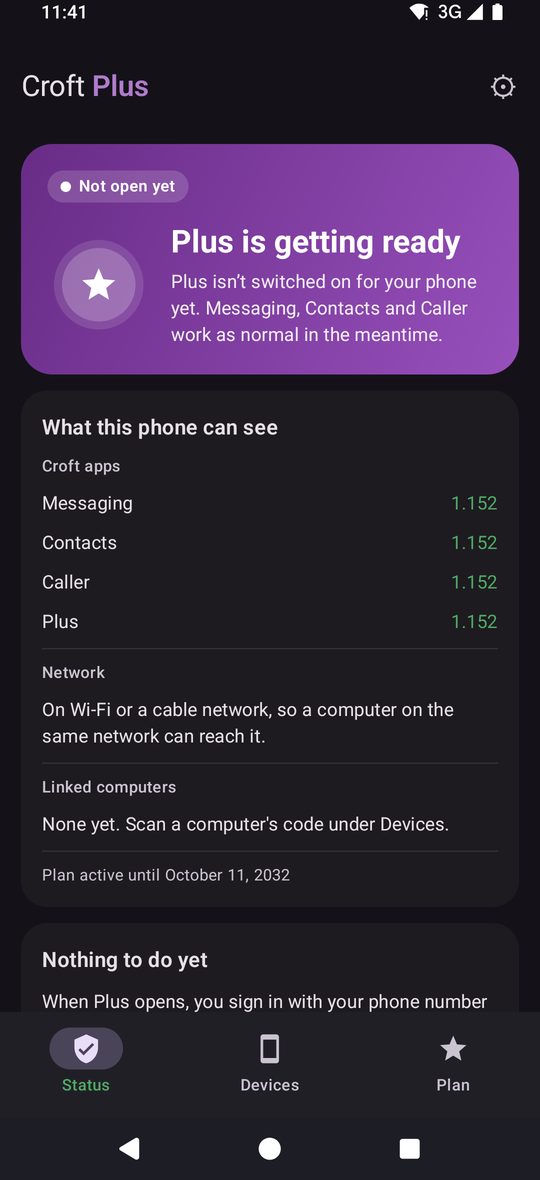
How Plus works, in full
Every Croft Plus detailShow all 26Hide
Sealed by default
- End-to-end sealed texts and files, a new key for every chat, forward secrecy after the first reply
- Deniable: no signatures, so a message proves nothing to a third party
- Texts up to 12,000 characters; files up to 100 MB on the standard route
Two routes
- Standard: held briefly until the other phone collects it
- Private: live through a relay, nothing stored, waits on your phone if they are offline and never falls back to SMS by itself
- A Plus or SMS label on every message says which way it went
No server needed to find friends
- Hidden hello: two phones that have each other saved find each other with a tiny invisible data message, no phone-book upload
- Mutual contacts only are shown as Croft; nobody else is ever marked
- A different phone claiming a number never replaces the one you verified
Feels like a chat app
- Delivery ticks, reactions, replies, edit with history, delete for everyone
- Typing and read receipts, both switchable
- Disappearing messages: 1 hour, 1 day or 1 week, on both phones
- Messages arrive in order, with a gap marked if one is late
Plus groups
- Mixed: Plus members sealed, everyone else by SMS, in one conversation
- Plus-only: never SMS, even if someone drops Plus: they are paused and you are told
- Join by invitation; usable as soon as one other member joins
- Roster and a group code that matches on every phone
- Privacy bar that says who is sealed and who is on SMS, and tells you when it changes
Your computer
- Link with a QR code and a six-digit match check
- Sign-in codes from your phone every 30 seconds for linked computers
- Use a tablet or second phone as a computer
- Unlink from either side, or start again with a new key
Plan and privacy
- US$25 a year, one plan for every device you link
- If a plan ends, texts go as ordinary SMS and MMS and nothing is lost
- The plan is a sealed date on your phone, not an account
- No ads, no tracking; Plus only uses the internet to reach the Plus service
Who can read what
Plus messages and files are end-to-end encrypted. Ordinary SMS and MMS cannot be, because the carrier network carries them. Croft says which is which.
There is no Croft account and no Croft server that holds your messages.
Where Plus stands today
Plus messaging and files, Plus groups, the Windows installer
Built, being proven (groups emulator-tested, real-phone testing next)
Plus billing, remote access for the computer
Preview: billing is simulated, no real payments yet. Remote access needs the Plus service, which is not live yet