Croft Caller
The phone dialler and in-call screen for Android and GrapheneOS, with call history, screening and voicemail handling. Free, with no ads, no telemetry and no internet permission. Calls still go through your carrier as normal.
The stock dialler on GrapheneOS does the basics and little more. Croft Caller shows who called and for how long, keeps notes and reminders with the call, and works hand in hand with Croft Messaging and Croft Contacts.
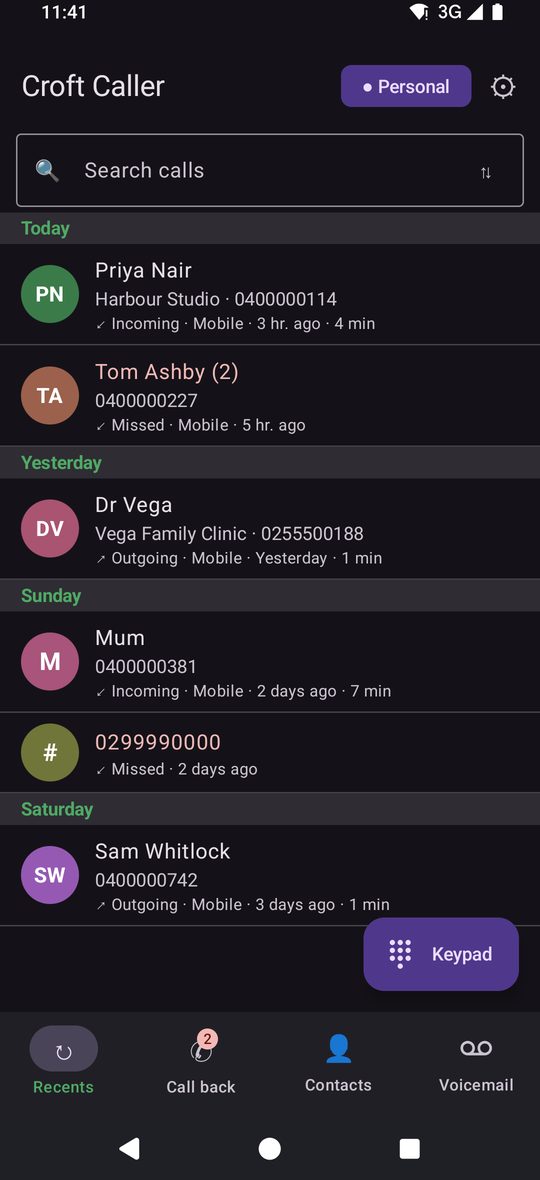
The dialler that works for you
Calls you can handle later
Numbers you don't know can be screened, and a missed call can leave a reminder to ring back by notification, text or email.
Know who is ringing
Photo, name, company and a line like "3 calls in the last 30 days, last Tuesday" before you answer.
Reply without picking up
Decline with a text from your quick replies, or write one. Texts and notes stay hidden while the phone is locked.
Everything Croft Caller doesShow all 37Hide
Dial
- Keypad with letters, name suggestions, long-press 0 for +, long-press 1 for voicemail
- Tabs: Recents, Call back, Contacts, Voicemail
- Confirm before calling from Recents
- Emergency numbers flagged on the keypad
- Handles tel: and voicemail: links from other apps
Recents
- Search your calls; filters All, Missed, Blocked, Personal, Business
- Group by day or by person with call and missed counts
- Select several to delete or block
- "Possible voicemail" tag on calls that connected after about 14 to 45 seconds
- Tap a call: call back, message, contact info, history, favourite, copy
Incoming and in-call
- Answer, decline, silence, or answer on speaker
- Decline with a text: Personal and Business replies, editable
- Mute, speaker, hold, keypad, add call, message; choose earpiece, speaker, Bluetooth or headset
- Call waiting: decline, hold and answer, end and answer
- Swap and merge two calls; conference list with talk privately and drop
- Notes about a person, shown the next time they ring
- Shows which SIM and a Wi-Fi call chip
After the call
- Call again, message, contact info, history
- Add a note or set a call-back reminder
- Follow-up text suggestions
Reminders and call-back
- Remind me to call back: 15 minutes, 1 hour, tomorrow 9 am
- By notification, a text to yourself or an email to yourself
- Exact alarms, kept across a restart
- A Call back tab collects missed calls and reminders
Voicemail
- Detects a waiting message from the network's signal and from carrier texts
- Notification, banner and a dot, with Listen to call your voicemail
- Names who left it and when, when the phone is told
- Optional note in Messages with a tap-to-call line
- Setup help: finds your carrier's number, with a test call, and a log of what the phone has heard
Spam and screening
- Silence unknown callers: contacts and anyone you called or texted recently still ring
- On-phone warnings: hidden number, foreign number, premium-rate, bursts of similar numbers, a number that mimics yours
- Block and unblock with the system block list
- Nothing is looked up online
Settings and looks
- First-run setup in one place, every step explained
- Light, dark or follow the phone, palettes shared with the suite
- Quick replies editor, and backup and restore of settings, notes and reminders
- Hide in screenshots
With Messaging
texts and calls know about each other
- Call a person from their conversation and it dials at once, with a bar to return to the call
- Message a caller from the call list, or reply to a missed call with a text
- A person's history shows calls and texts in one place
- A voicemail turns into a note in Messaging with a tap-to-call line (being fixed; depends on what each carrier sends)
- After a call, send a follow-up text in one tap
- Decline an incoming call with a text from Messaging's quick replies
With Contacts
your calls use your address book
- Names, photos and Business or Personal labels on every call
- Tap a caller to see and edit the whole contact
- Call a contact from Contacts and Caller places it at once
- Mark a number Personal or Business from the call list
- Favourites appear in Caller
Privacy
Croft Caller has no internet permission. It connects to the other Croft apps through small private links that only work between apps with the same signing key.